
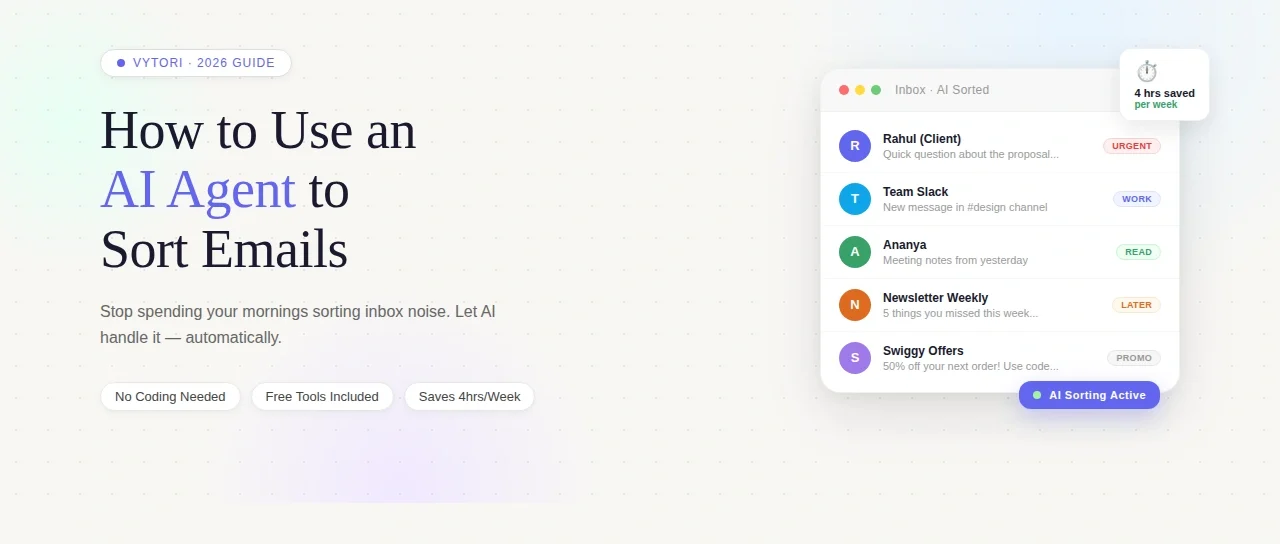
I used to spend the first 40 minutes of every morning just dealing with email. Not reading emails that mattered. Just sorting through the noise to find the ones that did. At some point I started wondering — is this just how work is supposed to feel? Like you’re always two steps behind before your day even starts?
The answer, it turns out, is no. And the fix is not another folder system or a stricter unsubscribe routine. It’s an AI agent that handles the sorting for you while you do literally anything else.
This article explains exactly how to use an AI agent to sort emails — what it actually means, how it works under the hood, which tools are worth your time, and what most guides don’t tell you about setting one up properly.
Why This Topic Actually Matters
Email is still the backbone of professional communication in 2026. It hasn’t been replaced by Slack or WhatsApp or any of the other tools that were supposed to kill it. If anything, the volume has increased — an average professional now spends 4.1 hours a day managing email. That’s more than half a standard 40-hour work week.
The problem is not that email exists. The problem is that most people are using their human brain to do a job that is genuinely better suited to a machine. Sorting, categorizing, prioritizing, flagging — these are pattern recognition tasks. AI is exceptionally good at pattern recognition. You, on the other hand, are better at the thing that comes after the sorting: actually deciding what to do.
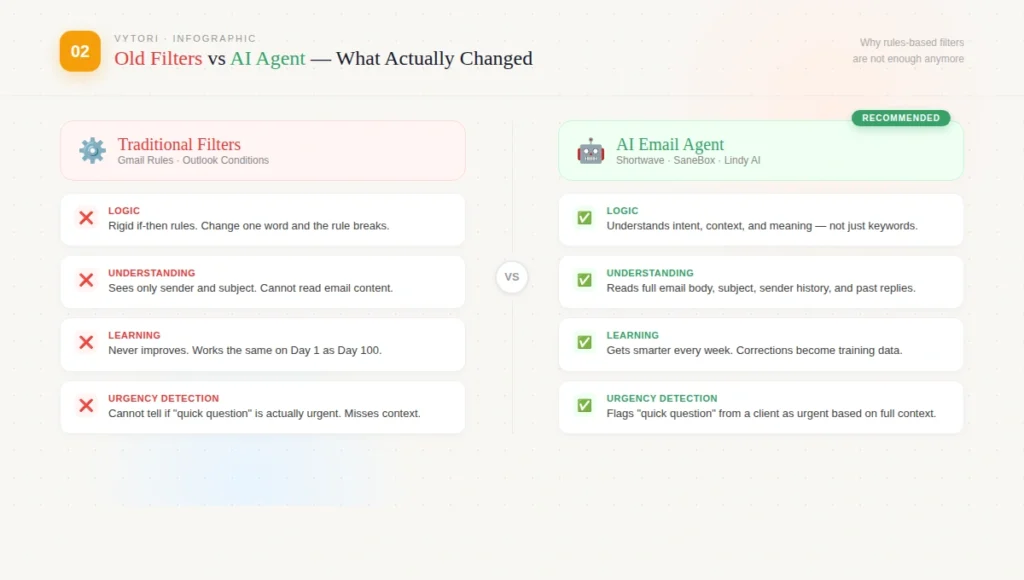
An AI agent for email sorting doesn’t just filter spam. Unlike traditional rules or filters — which operate on simple, rigid if-then logic — AI assistants are designed to understand nuance, context, sentiment, and intent. They don’t just sort mail; they read it, understand it, and help you act on it.
That’s the actual difference. And once you experience it, manual sorting feels like doing math on your fingers.
Who Should Care About This
If you’re a freelancer managing client emails across three different projects, a student with a scholarship inbox that looks like a warzone, or someone who works in any role where email is constant — this matters to you.
You don’t need to be technical. You don’t need to know what an API is. The tools available in 2026 are designed for people who just want the problem solved, not a computer science lesson.
The one situation where this matters most is when you’ve already tried folder systems, labels, and filters — and still feel like your inbox controls you more than you control it. That’s the sign your triage system needs an upgrade, not more manual effort.
What Most Guides Get Wrong
Almost every article on this topic either goes too deep into technical setup (writing Python scripts, connecting APIs) or stays so surface-level that it’s just a list of tool names with no real explanation.
The bigger mistake is that most guides treat email sorting as a one-time setup you do once and forget. It isn’t. Start by limiting the agent to labeling, prioritization, and summarization — avoid deletion or auto-sending at first. Review its decisions for a week, adjust the rules, then gradually increase automation. Treat the AI like a junior assistant: supervised first, trusted over time.
That last line is the most important thing in this entire article. People set up an AI agent, give it too much authority on day one, miss an important email, and then blame the tool. The tool isn’t the problem. The approach is.
Another thing guides get wrong: they assume everyone is sorting work email. A lot of people are managing newsletters, invoices, project updates, and personal communications all in the same inbox. The sorting logic for these is completely different and most guides don’t acknowledge that.
Deep Explanation: What an AI Email Agent Actually Does
Here’s the simplest way to understand it.
Your inbox is a stream of unstructured text arriving at random intervals. Each email has a sender, a subject, a body, and a history with you. A traditional filter can only see the surface — “if the sender is X, move to folder Y.” It’s rigid. Change the sender’s name and the rule breaks.
An AI agent sees deeper. AI agents leverage natural language processing to comprehend the intent and relevance of messages. Content analysis evaluates the subject, body, and even past interactions to classify email importance. Priority detection uses keywords, sender importance, and inferred urgency as factors in determining priority. Emails are then automatically labeled and filed, keeping the inbox decluttered and organized.
In plain language: the AI reads your emails the way a smart human assistant would. It notices that an email from a client saying “quick question” is actually urgent because of the context. It notices that a newsletter you’ve never opened in three months probably doesn’t need to land in your inbox anymore. It notices patterns you didn’t even know were there.
The “agent” part means it doesn’t just observe — it acts. It can label, file, prioritize, summarize long threads, and in more advanced setups, draft responses for you to review before sending.
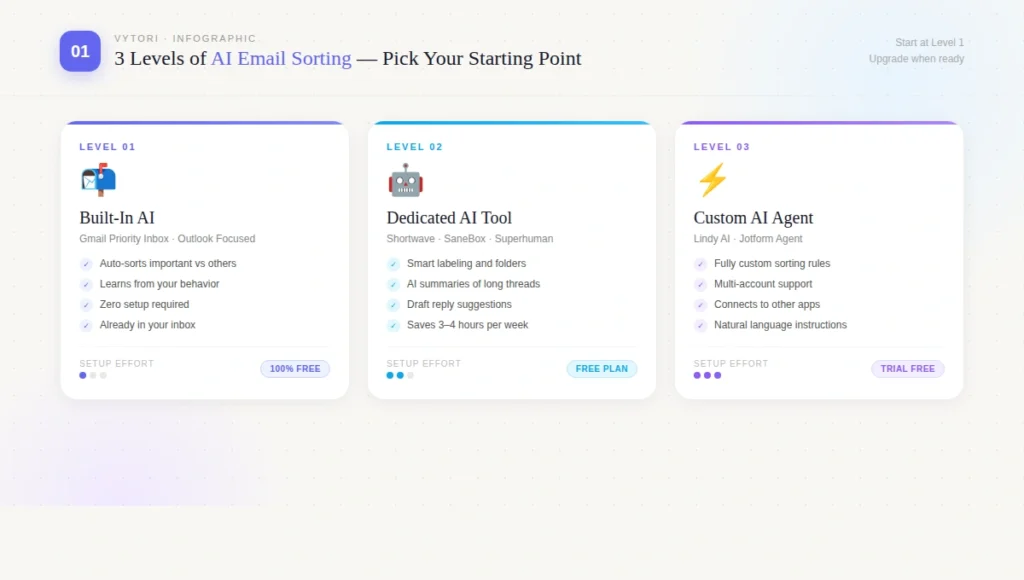
The practical setup has three levels:
The first level is built-in intelligence that already exists in your email client. Products like Gmail’s Priority Inbox and Microsoft Outlook’s Focused Inbox offer built-in solutions that learn user preferences over time. These are free, already connected to your inbox, and decent for basic sorting. The limitation is that they’re not customizable in any meaningful way — you take what they give you.
The second level is a dedicated AI email tool layered on top of your existing email client. Tools like Shortwave, SaneBox, or Superhuman connect to Gmail or Outlook via secure authorization and add a layer of intelligent sorting on top. Shortwave uses AI to sort emails, search your inbox, and draft replies. You can set it up to sort your emails automatically, or ask the AI agent to organize your inbox based on any criteria you have.
The third level is an agent platform like Lindy that you customize completely. You give custom instructions to your agent, all in natural language. It automatically prioritizes urgent messages, filters spam, and organizes emails by importance, reducing time spent on triage and the need for constant inbox checking. This level gives you the most control but requires a bit more setup upfront.
For most people, starting at level two and upgrading to level three if needed is the right path.
Real-World Implications
Here’s what actually changes when you get this right.
SaneBox, one of the older AI email tools in this space, is designed to save users up to 3–4 hours per week on email by automatically sorting incoming emails into different folders based on importance. That’s a conservative estimate for someone with a genuinely messy inbox.
Beyond time, there’s something less measurable but equally real: the mental load. Every unread email sitting in your inbox is a small cognitive tax. It pulls a tiny bit of your attention even when you’re not reading it. An organized inbox, where genuinely important things are surfaced and noise is filed away automatically, reduces that background pressure in a way that’s hard to quantify but very noticeable.
For students specifically, this matters differently. Your inbox probably mixes scholarship deadlines, assignment submission confirmations, spam from companies you signed up with once, and actual important emails from professors. AI email triage gets smarter over time — the more you use it, the better AI becomes at knowing what’s crucial versus what can wait, meaning it only gets more efficient while manual triage gets more tedious.
The practical implication: the earlier you set this up, the better it gets.
Comparison of AI Email Sorting Approaches
| Approach | Best For | Free Option | Setup Effort | Control Level |
|---|---|---|---|---|
| Gmail Priority Inbox | Basic sorting, casual users | Yes (built-in) | Zero | Low |
| Outlook Focused Inbox | Microsoft users, office email | Yes (built-in) | Zero | Low |
| SaneBox | Professionals, any email client | 14-day trial | Low | Medium |
| Shortwave | Gmail users, individuals | Yes (free plan) | Low | Medium |
| Superhuman | Power users, executives | No (paid only) | Medium | High |
| Lindy AI | Custom workflows, advanced users | 7-day trial | Medium | Very High |
| Jotform Gmail Agent | Gmail, team inboxes | Limited free | Low | High |
The table gives you the map. The explanation gives you the territory.
For someone just starting out: Gmail’s built-in Priority Inbox costs nothing and requires zero setup. It’s not perfect but it handles 60–70% of basic sorting automatically. Start here.
For someone who needs more control: Shortwave has a free plan and lets you ask the AI agent directly — “organize my inbox by project” or “flag everything from my team as urgent.” Unlike some other AI email apps, Shortwave has a free plan so you can check it out with no commitment required.
For someone managing a business inbox: Jotform Gmail Agent works directly in your Gmail inbox, automatically labels emails as they arrive using AI, and can automatically draft replies — though it will never send an email without human approval. The human-in-the-loop design is the right call for anything business-critical.
Key Facts Worth Knowing
By 2026, the sophistication of tools designed to manage email has evolved significantly. The rise of large language models and agentic workflows has transformed the inbox from a passive repository of messages into an active, intelligent workspace.
Most top-tier AI email tools in 2026 integrate via API with foundational models like GPT-4 or Claude. This means the intelligence behind your email sorting is the same class of technology that powers major AI assistants — applied specifically to your inbox.
AI classification learns patterns and makes intelligent decisions: it understands email meaning not just keywords, can classify one email into multiple categories simultaneously, detects priority based on content and urgency, extracts deadlines from email text, and improves accuracy based on your feedback.
Consistent use of an AI email agent can free approximately four hours per week for strategic work.
Expert Perspective: The Honest View
AI email agents are genuinely useful. But they’re also genuinely imperfect, and it’s worth knowing where the limits are before you rely on them.
The biggest real-world complaint from people who use these tools is false negatives — important emails getting sorted away because the AI misjudged the priority. This happens most in the first week or two while the system is learning your patterns. The fix is supervision, not abandonment.
If your AI assistant sounds fake, clients will lose trust. The best tools in 2026 offer style mimicry to sound exactly like you, avoiding the generic AI voice that is instantly recognizable and often alienating. This applies to auto-drafted replies more than sorting — but it’s worth being aware of.
There’s also a privacy dimension that most guides skip entirely. Any tool that reads your email needs authorization to access your inbox. Before connecting any third-party tool, check whether it uses OAuth (which never gives the tool your password) versus older authentication methods. Most reputable tools use OAuth. Jotform Gmail Agent uses OAuth, so you don’t have to share your password or worry about someone else reading your emails. Look for this as a minimum standard.
The balanced take: these tools work well for what they’re designed for. They don’t replace judgment. They handle the volume so your judgment can focus where it actually matters.
Future Outlook: Next 3 to 5 Years
The trajectory here is pretty clear.
Email agents are moving from reactive to proactive. Right now, most tools sort and label after an email arrives. The next generation is beginning to anticipate — flagging that you haven’t responded to a client in three days before the client has to follow up, or noticing that you have a deadline buried in an email from two weeks ago.
Agentic AI — where the tool can take multi-step actions across connected apps — is already entering email. Lindy’s Autopilot unlocks the ability for AI agents to use their own computers in the cloud, freeing agents from the limits of API integrations. In the next two to three years, this will become standard. Your email agent won’t just sort — it will coordinate.
The concern worth naming: as these agents get more capable, the question of what they should be allowed to do autonomously becomes more important. Auto-sending emails, deleting messages, unsubscribing on your behalf — these carry real consequences. The current best practice of keeping humans in the loop on consequential actions is likely to remain the right approach even as the tools get smarter.
For most users, the practical implication of where this is going is simple: the cost and effort of setting up AI email sorting will continue to drop, and the results will continue to improve. Waiting is not a neutral choice — it just means more hours spent on sorting that a machine could handle.
Final Takeaway for Beginners
Start with what’s already available in your email client — Gmail’s Priority Inbox or Outlook’s Focused Inbox. Use it for two weeks and notice what it gets right and wrong.
If you want more control, try Shortwave’s free plan. Give the AI agent clear instructions in plain language about what matters to you — who your important contacts are, which senders can wait, which subject lines signal urgency.
Give it a week before judging it. The first few days will feel imperfect. That’s normal — it’s learning your patterns.
The goal is not a perfect inbox. The goal is an inbox where the important things surface without effort and the noise is handled without your attention. That’s a realistic outcome with the tools available right now.
Your time in the morning is worth something. Stop spending it on sorting.
Frequently Asked Questions
1.Do I need coding skills to set up an AI email agent?
No. Every tool mentioned in this guide works through a regular browser or app interface with no coding required. You connect your email account, give the agent instructions in plain language, and it handles the rest. Technical setup is an option for advanced users, not a requirement for anyone.
2.Is it safe to let an AI agent access my inbox?
It depends on the tool. Look for tools that use OAuth authorization — this means the tool can access your email without ever knowing your password. Reputable tools like Shortwave, SaneBox, Superhuman, and Lindy all use this approach. Avoid any tool that asks for your email password directly.
3.Will the AI accidentally delete important emails?
This is the most common concern and the reason the advice in this guide is to start with labeling and sorting only — not deletion or auto-sending. If the agent is only moving emails to folders or applying labels, nothing is lost. You can always check the sorted folders and correct mistakes during the first week.
4.How long does it take for the AI to learn my preferences?
Most tools improve noticeably within five to seven days of consistent use. The AI learns from your corrections — when you move an email it sorted incorrectly, that becomes training data. Full calibration typically takes two to three weeks.
5.What’s the difference between AI email sorting and just using Gmail filters?
Gmail filters work on fixed rules — if a sender is X, do Y. They don’t understand content, context, or intent. AI sorting reads the actual email, understands what it’s about, infers urgency and importance, and can handle situations that no fixed rule anticipated. It’s the difference between a rigid script and genuine judgment.
6.Can AI sort emails across multiple accounts?
Yes, several tools including SaneBox and Lindy support multiple email accounts simultaneously. This is particularly useful if you manage both a personal Gmail and a work email and want consistent sorting across both.
7.Is there a completely free option that actually works?
Gmail’s Priority Inbox and Outlook’s Focused Inbox are completely free and already built into your email. They handle basic sorting reasonably well. For more control, Shortwave has a free plan. These are the right starting points before committing to a paid tool.
8.What if I try it and it makes my inbox worse?
Every tool on this list can be turned off or disconnected in under a minute. Nothing is permanent. The worst realistic outcome is that you spend an hour setting something up, decide it’s not for you, and go back to how things were. The upside is recovering hours every week indefinitely.