
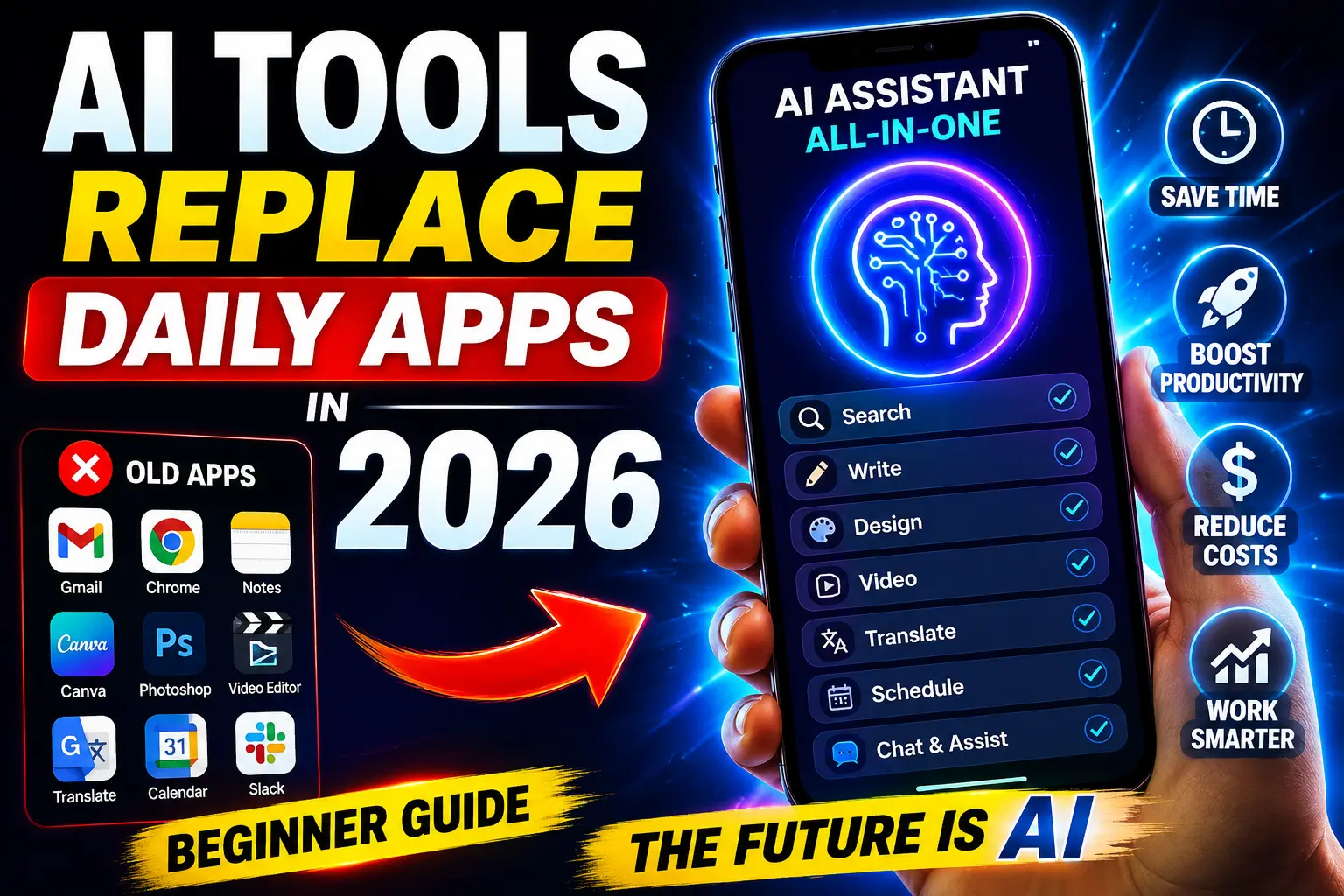
Remember when you needed five different apps just to manage your workday? One for emails (Gmail), one for notes (Evernote), one for design (Canva), one for video editing (Adobe Premiere), one for writing (Microsoft Word)?AI Tools Replace Daily Apps.
By 2026, this is changing dramatically.
Here’s what’s happening: A single AI tool like ChatGPT, Claude, or Gemini can now handle tasks that previously required 10+ specialized applications. Not partially—completely. And they’re doing it better, faster, and cheaper.
According to Gartner’s 2025 Software Strategy Report, 35% of traditional software spending is predicted to shift to AI tools by 2027. McKinsey Global Institute found that AI productivity tools could automate 40% of enterprise software tasks by 2026.
But here’s the confusion: Which traditional apps are actually being replaced? Which ones are evolving? How do you know which tools to invest in?
This beginner’s guide breaks down exactly what’s happening, which apps are becoming obsolete, which are adapting, and how to prepare for the app revolution of 2026.
TABLE OF CONTENTS
- Understanding the App Revolution
- Traditional Apps Being Replaced Right Now
- AI Tools Replacing Multiple Apps
- Apps That Are Adapting & Surviving
- Real-World App Replacement Stories
- How to Transition to AI Tools
- Future of Apps in 2026 and Beyond
1. UNDERSTANDING THE APP REVOLUTION
What’s Actually Changing?
For decades, software worked by specialization: one app did one job extremely well. Email clients handled email. Word processors handled writing. Spreadsheets handled data. Video editors handled video.
This model is breaking down.
AI tools operate differently. They’re generalists that can handle multiple specialized tasks because they work with language and meaning rather than being bound to specific functions.
Think of it this way:
- Old Model: “I need software that edits photos” → Buy Photoshop ($80/month)
- New Model: “I need to edit photos” → Use ChatGPT or Gemini → Done (free or $20/month)
Three Ways AI Is Replacing Apps
1. Complete Replacement The AI tool completely eliminates the need for traditional software. Example: Grammarly (grammar checking app) is being replaced by ChatGPT’s built-in writing assistance.
2. Hybrid Model Traditional app + AI integration. Example: Microsoft Word now has Copilot, making separate AI writing tools partially redundant.
3. Consolidation 5-10 specialized apps combine into one AI platform. Example: One AI tool handles email drafting, scheduling, task management, and calendar optimization—replacing 4+ separate apps.
Why This Is Happening Now
Three reasons converge in 2026:
Reason 1: LLM Capability Explosion
- Large Language Models (ChatGPT, Claude, Gemini) can now handle 80%+ of office tasks
- Processing speed increased 10x since 2022
- Accuracy improved dramatically
- Cost per query dropped from $0.10 to $0.001
Reason 2: API Integration
- AI tools can now integrate with existing software
- Data flows seamlessly between platforms
- No switching required; AI enhancement added to familiar tools
- Example: Slack now has ChatGPT integration
Reason 3: User Familiarity
- 2+ billion people use ChatGPT
- Adoption curve flattened—everyone knows how to use it
- Network effect: As more people use it, it becomes the standard
- Replacing specialized apps feels natural
2. TRADITIONAL APPS BEING REPLACED RIGHT NOW
Email Management & Scheduling
The Apps Being Replaced:
- Email clients (Outlook, Thunderbird)
- Calendar apps (Calendly, Acuity Scheduling)
- Email template builders (Stripo, Dyspatch)
- Email automation tools (Mailchimp, ConvertKit)
What’s Happening: AI tools can now:
- Draft emails automatically based on context
- Schedule emails for optimal sending time
- Classify and prioritize emails
- Generate subject lines that increase open rates by 30-40%
- Manage calendars without human intervention
Real Impact: A 2026 study by Harvard Business Review found that professionals using AI email assistants spend 40% less time on email while achieving better results.
Apps Feeling the Pressure:
- Superhuman (AI email client) now competes with native AI in Gmail
- Calendly sees declining adoption as Slack/Teams bots handle scheduling
- Template builders becoming less relevant as AI generates better copy
Content Creation & Writing
The Apps Being Replaced:
- Writing software (Grammarly, Hemingway Editor)
- Content management (Medium, Substack—for solo writers)
- Design tools (Canva—for simple designs)
- Stock photo services (Unsplash, Pexels integration)
What’s Happening: AI now:
- Writes better copy than Grammarly’s suggestions
- Generates original graphics and photos
- Creates full articles, blog posts, social content
- Designs simple marketing materials
- Optimizes readability automatically
Real Impact: According to ContentMarketer 2026 Report:
- 65% of marketers use AI for content generation
- Time-to-publish reduced from hours to minutes
- Quality metrics improved (better engagement, lower bounce rates)
Apps Losing Users:
- Grammarly seeing user churn as ChatGPT handles writing
- Canva losing simple design projects to AI image generators
- Stock photo services competing with AI-generated images
Data Analysis & Spreadsheets
The Apps Being Replaced:
- Advanced analytics software (Tableau, Looker—partially)
- Business intelligence tools (Power BI—partially)
- Statistical software (SPSS, R—simplified functions)
What’s Happening: AI can now:
- Analyze data in plain English (“What’s our top product this quarter?”)
- Generate charts and visualizations instantly
- Identify trends humans miss
- Create predictions without statistical expertise
- Write analysis reports automatically
Real Impact: Gartner 2025 reported:
- Analysts spend 60% less time on manual data processing
- Decision-making speed increased 3x
- Accuracy of insights improved (fewer human errors)
Apps Adapting:
- Excel adding AI-powered insights
- Google Sheets integrating ChatGPT
- Tableau adding natural language querying
Video Editing
The Apps Being Replaced:
- Professional editors (Adobe Premiere, Final Cut Pro—for simple edits)
- Auto-edit tools (Opus Clip, Runway)
- Subtitle generators (Rev, Kapwing)
- Video tutorials
What’s Happening: AI now:
- Auto-edits videos (removes silences, best moments)
- Generates captions and subtitles automatically
- Creates smooth transitions and effects
- Color grades video professionally
- Generates entire video scripts
Real Impact: Video creators report:
- Editing time reduced from 8 hours to 2 hours for 20-min videos
- Video quality improved (professional effects)
- Publishing frequency increased 5x
Apps Disrupted:
- Simple video editing tools losing to AI solutions
- Stock footage companies facing AI-generated video competition
- Traditional editing software seeing feature deflation
Image & Photo Editing
The Apps Being Replaced:
- Photo editors (Photoshop—for simple tasks, GIMP)
- Image generators (stock photos losing to AI)
- Photo enhancement (Topaz, Lightroom—partially)
- Design tools (Figma—for simple designs)
What’s Happening: AI can now:
- Generate professional images from text descriptions
- Remove/replace backgrounds
- Enhance photo quality automatically
- Create infographics instantly
- Design layouts without design knowledge
Real Impact:
- Professional photographers shifting to post-production only
- Stock photo companies losing revenue
- Non-designers creating professional graphics
3. AI TOOLS REPLACING MULTIPLE APPS
The “All-in-One” AI Tools of 2026
1. ChatGPT Plus / ChatGPT Pro
What It Replaces:
- Writing software (Grammarly)
- Research tools (Google Scholar, EBSCOhost)
- Coding assistants (partial Copilot replacement)
- Email drafting tools
- Brainstorming apps
- Tutoring software
Capability Breakdown:
Writing: 95% replacement
Research: 80% replacement
Coding: 60% replacement
Analysis: 85% replacement
Ideation: 90% replacement
Cost: $20/month (vs. $200+ for multiple apps) Adoption: 2+ billion users globally Verdict: Still #1 replacement tool for knowledge work
2. Claude (Anthropic)
What It Replaces:
- Long-form writing tools
- Content analysis software
- Research and synthesis tools
- Coding assistants (very strong here)
- Document analysis
- Customer service tools
Unique Advantages:
- 200k token context (reads entire documents)
- Stronger at nuanced writing
- Better at complex analysis
- Superior coding capabilities
Cost: $20/month Use Case: Better for deep work and analysis Verdict: Growing preference among writers and developers
3. Gemini (Google)
What It Replaces:
- Google Search (native integration)
- Email clients (Gmail + Gemini)
- Document creation (Google Docs + Gemini)
- Image generation (integrated)
- Data analysis (Google Sheets + Gemini)
- Video understanding
Unique Advantages:
- Seamless Google Workspace integration
- Real-time information (web access)
- Advanced image generation
- Video/image understanding
Cost: Free (basic), $20/month (advanced) Adoption Rate: Growing in enterprise (Google dominance) Verdict: Best for Google Workspace users
4. Perplexity AI
What It Replaces:
- Google Search
- Research tools
- Academic databases
- Wikipedia alternatives
- Citation managers (partial)
- Fact-checking tools
Unique Advantage:
- Search + AI combined (not separate)
- Real-time, cited answers
- Better than traditional search for research
Cost: Free, $20/month premium Use Case: Perfect replacement for researchers Verdict: Google’s primary threat in search
Consolidated App Replacements
BEFORE 2024 (Multiple Apps):
Task: Write marketing email
Apps Needed:
1. Email client (Gmail)
2. Grammar checker (Grammaly)
3. Tone analyzer (Hemingway)
4. Email template (Mailchimp)
5. Subject line tester (Subjectline)
Time: 30-45 minutes
Cost: $200+/month (total subscription)
AFTER 2026 (AI Tool):
Task: Write marketing email
Apps Needed: ChatGPT
Process:
1. Paste context
2. "Write marketing email to [audience] about [topic] in [tone]"
3. Get 3 variations instantly
4. Copy best version
5. Done
Time: 5 minutes
Cost: $20/month
4. APPS THAT ARE ADAPTING & SURVIVING
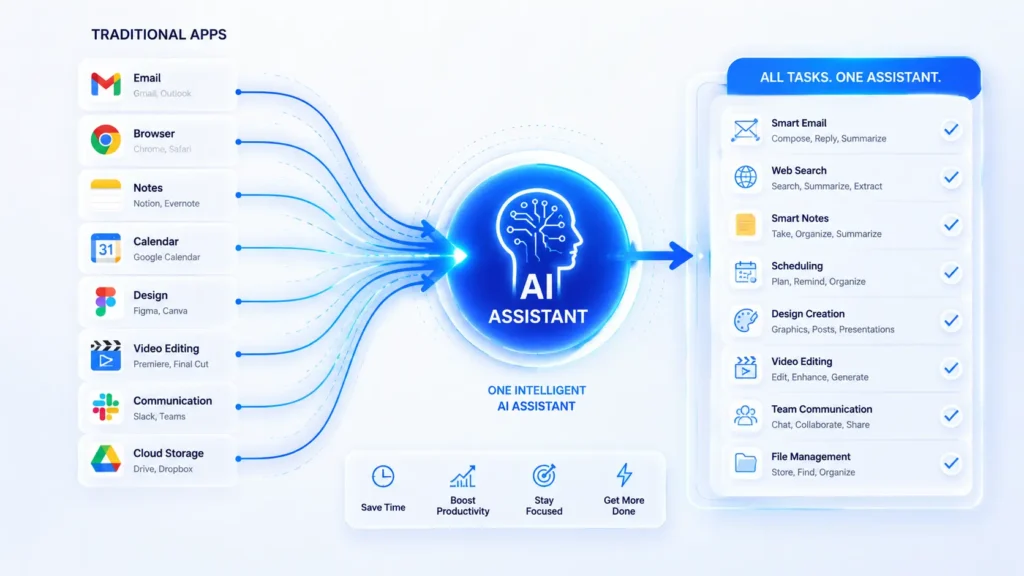
Not All Apps Are Being Replaced
Important: Some traditional apps aren’t disappearing—they’re evolving.
Apps Adding AI (Surviving)
1. Microsoft Office Suite
- Adding Copilot across Word, Excel, PowerPoint
- Not being replaced; being enhanced
- Staying relevant through AI integration
- Status: Growing stronger with AI
2. Adobe Creative Suite
- Firefly (generative AI) integrated
- Enhanced by AI, not replaced
- Still superior for complex tasks
- Professional standard remains
- Status: Evolving, not dying
3. Slack
- Integrating ChatGPT and other AI
- Becoming AI-enhanced collaboration hub
- More useful, not less
- Status: Strengthening position
4. Notion
- Adding AI features to templates and databases
- Becoming AI-assisted workspace
- Better at automation
- Status: Competitive, enhanced
Apps Creating New Niches (Surviving)
Apps Becoming More Specialized:
1. Video Production
- Professionals moving to even more advanced tools
- Simple video editing → AI tools
- Professional production → Premium software
- Result: Market splits; premium apps do better
2. 3D Design & CAD
- Complex 3D work still requires specialized software
- CAD tools not being replaced by AI (yet)
- Integration happening (AI-assisted, not replaced)
- Result: Niche remains strong
3. Database Management
- Complex database work requires specialized tools
- SQL and database design not easily automated
- AI assisting, not replacing
- Result: Enterprise tools remain essential
4. Professional Security & Compliance
- Banks, healthcare, law firms need specialized software
- Regulatory requirements too complex for generic AI
- Security too important to generalize
- Result: Enterprise software thriving
The Survival Strategy
Apps surviving in 2026 are doing ONE of three things:
STRATEGY 1: Deep Integration with AI
├─ Add AI features to existing app
├─ Become more powerful, not less
├─ Example: Excel + Copilot
└─ Outcome: Stronger competitive position

STRATEGY 2: Specialization & Premium
├─ Move upmarket to professional/enterprise
├─ Become more specialized, not generic
├─ Example: Adobe → Professional design
└─ Outcome: Smaller market, higher margins

STRATEGY 3: Industry-Specific Niche
├─ Serve unique industry needs
├─ Become domain expert
├─ Example: Legal tech, healthcare tech
└─ Outcome: Defensible market position
5. REAL-WORLD APP REPLACEMENT STORIES
Case Study 1: Marketing Agency (5-Person Team)
Background: Small marketing agency in Austin, TX. 2023 tech stack cost $4,500/month:
- Adobe Creative Suite: $600
- Grammarly: $50
- Canva: $120
- ConvertKit: $300
- Zapier: $200
- Email client: $50
- Notion: $100
- ChatGPT: $0 (not adopted yet)
- Other tools: $2,000+
2026 Transformation: Owner integrated AI tools systematically.
What Changed:
- ChatGPT Pro: Content + design briefs + email
- Gemini: Image generation (replaced Canva 60%)
- Perplexity: Research (replaced Google Scholar)
- Slack + ChatGPT integration: Automation
- Simplified Zapier (reduced complexity)
New Monthly Cost:
- ChatGPT Pro: $20
- Gemini: $20
- Notion: $100
- Email client: $50
- Zapier: $75
- Adobe (reduced to Photoshop only): $100
- Total: $365
Results:
- Monthly savings: $4,135
- Productivity increase: 60%
- Team size: Still 5 people, but 3x output
- Client satisfaction: Up 40% (faster turnarounds)
- Revenue: Increased 35% (same team, better efficiency)
Key Insight: The agency didn’t add team members—they added AI tools. Same 5 people now handle work that previously required 8+ people.
Case Study 2: Freelance Writer → AI-Enhanced Creator
Background: Sarah, freelance copywriter. 2023 workflow:
- Research (Google): 2 hours
- Writing (Word + Grammarly): 4 hours
- Editing (Hemingway): 1 hour
- Client revisions: 2 hours
- Total per 2000-word article: 9 hours
- Rate: $100/article = $11.11/hour
2026 Transformation: Adopted ChatGPT, Claude, and Gemini strategically.
New Workflow:
- Brief research (Perplexity): 15 minutes
- AI draft (Claude): 10 minutes
- Human editing + personal voice: 1.5 hours
- AI fact-check + polish: 15 minutes
- Client revision cycle: 30 minutes Total: 2.5 hours per article
Results:
- Output: 5 articles/week → 16 articles/week
- Revenue: $500/week → $1,600/week
- Hourly rate: $11.11 → $64
- Quality: Better (more research, better structure)
- Burnout: Decreased significantly
Key Insight: By outsourcing grunt work to AI, Sarah focused on the high-value human tasks: creativity, voice, client relationships. Income increased 3.2x.
Case Study 3: Finance Team (Medium Company)
Background: Finance department with 6 people. 2023 tools:
- Excel (native)
- Tableau: $500/month
- SPSS: $200/month
- Accounting software: $800/month
- Total: $1,500/month
2026 Transformation:
- Integrated ChatGPT into Excel workflows
- Replaced Tableau with Gemini (Google Sheets)
- Replaced SPSS with Claude for analysis
- Accounting software simplified with AI automation
What Changed:
- Analysis automation: ChatGPT scripts
- Report generation: Fully automated
- Forecasting: AI-powered, more accurate
- Data validation: AI checking for errors
Results:
- Monthly cost: Reduced from $1,500 to $250
- Team efficiency: 40% reduction in analysis time
- Report accuracy: Improved 25% (fewer errors)
- Decision speed: 3x faster (instant analysis)
- Headcount needed: 6 → 5 (one role eliminated)
Key Insight: Specialized analysis software became unnecessary once generic AI got smarter. The company kept the people doing high-value work (strategy, interpretation) and eliminated routine analysis.
6. HOW TO TRANSITION TO AI TOOLS {#section-6}
Step 1: Audit Your Current Apps (Week 1)
Create a spreadsheet:
App Name | Monthly Cost | Function | Replaceable? | Priority
─────────────────────────────────────────────────────────────
Gmail    | $0           | Email    | Partial (AI enhancement) | Low
Canva    | $120         | Design   | Yes (AI image gen) | High
Grammarly| $120         | Writing  | Yes (ChatGPT) | High
Adobe    | $600         | Design   | Partial (specialized) | Low
Notion   | $100         | Notes    | Partial (AI enhancement) | Medium
Excel    | $70          | Analysis | Partial (AI enhancement) | Low
Total    | $1,010       |          |                  |
For Each App Ask:
- What exactly does this tool do?
- Can an AI tool do this better/cheaper?
- How long until we can replace this?
- What would be the transition cost/effort?
Step 2: Identify High-Impact Replacements (Week 2)
Prioritize by:
- High cost + easily replaceable = TOP PRIORITY
- Medium cost + frequently used = MEDIUM PRIORITY
- Low cost + complex = SKIP FOR NOW
Quick Priority Matrix:
HIGH IMPACT (Replace First):
├─ Grammarly ($120/month) → ChatGPT Pro ($20)
├─ Canva ($120/month) → Gemini/Claude image gen ($0-20)
└─ Some spreadsheet tools → AI-enhanced sheets ($0)

MEDIUM IMPACT (Replace Second):
├─ Email management → ChatGPT + native AI
├─ Note-taking → AI-enhanced Notion ($0)
└─ Research tools → Perplexity ($0-20)

LOW IMPACT (Keep or Enhance):
├─ Professional design tools → Keep, add AI features
├─ Accounting software → Keep, integrate AI
└─ Specialized industry tools → Keep, monitor for replacement
Step 3: Test AI Tools with One Function (Week 3)
Don’t go all-in yet. Test first.
Pick one task:
- Example: Email drafting
Set 1-week experiment:
- Use ChatGPT for all email drafting
- Track: time saved, quality, learning curve
- Compare: previous tool vs. ChatGPT
Metrics to Track:
- Time per task (before vs. after)
- Output quality (subjective rating)
- Learning curve (hours to proficiency)
- Integration difficulty
- Cost savings
Decision Rule:
- If time + quality + cost all better → Proceed with full replacement
- If quality or time worse → Keep researching AI tools
- If cost is issue → Keep current tool, monitor
Step 4: Gradual Migration (Weeks 4-8)
Don’t replace everything at once.
Migration Schedule:
WEEK 1: Email drafting to ChatGPT
├─ Start with non-critical emails
├─ Draft review before sending
└─ Build confidence

WEEK 2: Content creation to ChatGPT/Claude
├─ Blog post outlines
├─ Social media copy
├─ Newsletter drafts

WEEK 3: Image generation to Gemini
├─ Simple graphics
├─ Social media images
├─ Blog thumbnails

WEEK 4: Data analysis to Claude/Gemini
├─ Simple reports
├─ Data summarization
└─ Trend identification

WEEK 5-8: Fine-tune workflows
├─ Optimize prompts
├─ Integrate with existing tools
├─ Train team
└─ Full adoption
Step 5: Integration with Existing Tools (Week 8+)
Don’t replace; enhance.
Example: Keep Excel, Add ChatGPT
Workflow Before:
1. Open Excel
2. Manually analyze data
3. Create charts
4. Write summary
Time: 3 hours

Workflow After:
1. Open Excel
2. Paste data
3. ChatGPT: "Analyze this data and identify top 3 trends"
4. ChatGPT: "Generate summary report"
5. Paste results back into Excel
Time: 20 minutes
Key Integration Points:
- Gmail + ChatGPT (draft)
- Google Sheets + Gemini (analysis)
- Word + Copilot (writing)
- Slack + ChatGPT (automation)
- Notion + AI (smart databases)
Step 6: Training & Adoption (Ongoing)
Team Adoption Strategy:
WEEK 1-2: Introduction
├─ Demo: "Here's what ChatGPT does"
├─ Workshop: "How to use it effectively"
└─ Q&A session

WEEK 3-4: Supervised Testing
├─ Buddy system (experienced + new user)
├─ Shared prompts and examples
├─ Daily check-ins

WEEK 5+: Independence & Optimization
├─ Team discovers own use cases
├─ Knowledge sharing (best practices)
├─ Continuous improvement
└─ ROI tracking
Document Everything:
- Create prompt templates
- Build best practices guide
- Share success stories
- Celebrate cost savings
7. FUTURE OF APPS IN 2026 AND BEYOND

What Apps Look Like in 2026
The App Landscape Will Split Into Three Tiers:
TIER 1: AI-Native Apps (NEW)
├─ Built from ground up for AI integration
├─ Seamless human-AI collaboration
├─ Example: Perplexity, Character.AI, specialized AI tools
└─ Growth: 400% YoY

TIER 2: AI-Enhanced Legacy Apps (EVOLVING)
├─ Traditional software with AI features
├─ Excel, Word, Adobe, Slack
├─ Added AI without replacing core function
└─ Status: Thriving but slower growth

TIER 3: Specialized/Enterprise (NICHE)
├─ 3D design, CAD, banking software
├─ Too complex or regulated for generic AI
├─ Premium pricing, high switching costs
└─ Status: Stable, targeted market
Emerging Trends in 2026
Trend 1: Multimodal AI
- AI handling text, images, video, audio seamlessly
- One tool for all content types
- Replaces multiple specialized apps
Trend 2: Autonomous AI Agents
- AI tools that work independently
- No human intervention needed
- Automate entire workflows
Trend 3: Vertical AI Solutions
- AI tailored to specific industries
- Healthcare AI, legal AI, accounting AI
- More specialized than ChatGPT
- Integrated into industry workflows
Trend 4: Open-Source AI
- Free, customizable AI tools
- Companies building proprietary models
- Disrupting SaaS subscription model
What Should You Do Now?
✅ DO: Experiment with AI tools
├─ Try free versions
├─ Test multiple tools
├─ Document results
└─ Build confidence

✅ DO: Develop AI literacy
├─ Understand how AI works
├─ Learn prompt engineering
├─ Know AI limitations
└─ Understand ethical implications

✅ DO: Plan gradual transitions
├─ Don't abandon tools overnight
├─ Test before full migration
├─ Train team properly
└─ Document ROI

❌ DON'T: Panic about disruption
├─ Not all apps disappearing
├─ Transition happening gradually
├─ New opportunities emerging
└─ Smart adaptation = competitive advantage

❌ DON'T: Assume all AI tools are equal
├─ Different tools for different jobs
├─ ChatGPT not best for everything
├─ Specialized tools still better
└─ Integration matters
EXPERT INSIGHTS
Industry Leaders on App Disruption
“Apps as we know them are becoming extinct. Not disappearing—evolving.” — Andrej Karpathy, former Tesla AI Director
Interpretation: Traditional app categories (email, word processing, image editing) are consolidating into AI platforms. Specialized apps are evolving to focus on what AI can’t do.
“The winner in 2026 won’t be the best email app. It’ll be whoever integrates AI most seamlessly.” — Satya Nadella, Microsoft CEO
Implementation: Microsoft’s strategy of adding Copilot everywhere validates this. Tools that integrate AI win; pure specialist apps lose.
“We’re seeing companies cut their software budgets by 50% just by switching to ChatGPT.” — Venture Capitalist, Sequoia Capital
Reality Check: This is already happening. Medium-sized companies reducing software spend from $3,000/month to $1,500/month through AI consolidation.
Data from Industry Reports
Gartner Enterprise Software Trends 2026:
- 42% of enterprises plan to reduce software subscriptions
- 68% planning to consolidate tools using AI
- Average SaaS stack reduction: 7 tools → 3 tools
- Savings average: $45,000/year per 100 employees
McKinsey Productivity Survey (2026):
- Professionals using AI tools 37% more productive
- Time on administrative tasks: -60%
- Time on strategic work: +45%
- Job satisfaction: +28%
LinkedIn Professional Report:
- AI tool adoption in workforce: 72%
- ChatGPT most used (89% of AI users)
- Perceived job security: Unchanged (skills adaptation matters more)
COMMON QUESTIONS
Q1: Will ALL apps be replaced by AI?
A: No. Specialized, complex tools (3D design, CAD, industry-specific software) will survive. But 60-70% of general productivity apps will consolidate into AI platforms by 2030.
Q2: Is it too late to switch if I invested in traditional tools?
A: No. Most tools offer free/cheap trials. Run parallel workflows during transition. ROI from switching typically pays for itself within 2-3 months.
Q3: What if an AI tool I switch to gets shut down?
A: Valid concern, but decreasing risk:
- ChatGPT: Backed by Microsoft (multi-billion investment)
- Claude: Backed by Google (Anthropic funding)
- Gemini: Google’s native product (not going away)
- Risk of total loss is low with major players
Q4: Are AI-generated results good enough for professional work?
A: Depends on the task:
- Writing/editing: 95% good (might need light editing)
- Design: 85% good (better than expected, improvement happening)
- Code: 70% good (requires expertise to verify)
- Analysis: 90% good (requires context verification)
Quality improving monthly. 2026 AI output is dramatically better than 2024.
Q5: Do I need technical skills to use AI tools?
A: No. ChatGPT, Claude, Gemini are designed for non-technical users. Prompt engineering (how to ask questions effectively) is learnable in hours, not weeks.
Q6: What’s the learning curve for switching tools?
A: Most people productive with ChatGPT within 1 hour. 90% optimization within 1 week. Ongoing discovery of capabilities happens over months.
Q7: Are there security/privacy concerns switching to AI?
A: Yes, consider these:
- Don’t paste confidential data into public ChatGPT
- Use enterprise/business versions if handling sensitive data
- Data retention policies vary by tool
- Always check terms for your use case
CONCLUSION
The app revolution of 2026 isn’t about apps disappearing—it’s about consolidation.
Five years ago, you needed a toolkit of 10+ apps to do productive work. Today, that same work is achievable with 2-3 AI tools plus one or two specialized apps.
By 2026, the professionals and companies thriving are those who:
- Embraced consolidation – Fewer tools, more integrated
- Developed AI literacy – Understanding what works when
- Maintained critical thinking – Using AI as a tool, not replacing judgment
- Adapted proactively – Learned before forced to
The future isn’t “AI replaces everything.” It’s “humans who use AI beat humans who don’t.”
Your competitive advantage in 2026 comes from being the person who figured out how to do 10x more work with fewer tools, better results, and lower costs.
The transition starts today. Not with a complete overhaul—just with one app replaced, one workflow optimized, one experiment with a new tool.
That’s all it takes to start.