
I posted my first Instagram Reel in January 2024. It took me four hours to create — scripting in Notes app, recording 47 takes because I kept stumbling over words, editing in CapCut until 2 AM, finding copyright-free music, adding captions manually. The Reel got 340 views and 12 likes. I almost quit.ai tools for Instagram reels
Fast forward to 2026: I create 5-7 Reels weekly in under 90 minutes total using AI tools. My average Reel gets 15,000-25,000 views, my account grew from 800 to 34,000 followers in 8 months, and brands now pay me ₹25,000-₹50,000 per sponsored Reel. Not because I got better on camera (I’m still awkward), but because I learned which AI tools actually work for Reels creation.
This article is the complete guide to AI tools that transform Reels creation from 4 hours of frustration to 15 minutes of efficiency — the tools creators actually use, what each one does best, and the exact workflow that works in 2026.
Why AI Tools Matter for Instagram Reels
Instagram’s algorithm in 2026 rewards one thing above all: consistency. Posting 5-7 Reels weekly gets exponentially more reach than posting 1 perfect Reel weekly. But creating 5-7 Reels manually means 20-30 hours of work. That’s unsustainable.
The data: Accounts posting 4+ Reels weekly get 3.5x more reach than accounts posting 1-2 Reels weekly (Instagram internal data, 2025).
The problem: Most creators can’t sustain that pace because:
- Scripting takes 1-2 hours per Reel
- Recording takes 30-90 minutes
- Editing takes 1-3 hours
- Finding music/effects takes 30 minutes
AI solution: Reduce total time to 10-20 minutes per Reel by automating:
- Script generation (2 minutes vs 60 minutes)
- Voiceover creation (3 minutes vs recording 47 takes)
- Video editing (5 minutes vs 2 hours)
- Caption/hook writing (1 minute vs 30 minutes)
Real impact: When Reel creation takes 15 minutes instead of 4 hours, posting daily becomes realistic. That consistency drives growth.
THE 10 BEST AI TOOLS FOR INSTAGRAM REELS
1. CapCut AI — Best All-in-One Free Tool
What it does: Full video editor with AI features — auto-captions, background removal, AI effects, text-to-speech, trending templates.
Why it’s the best for Reels:
- Vertical video optimized (9:16 default)
- Trending Reels templates updated weekly
- Auto-captions in 20+ languages (critical for watch time)
- AI background removal (no green screen needed)
- Completely free, no watermark
How to use it:
- Import your clips
- Apply trending template (browse “Reels” category)
- Auto-generate captions (tap text → auto-captions)
- Add trending audio from CapCut library
- Export 1080p directly to Instagram
Best for: Beginners to advanced, lifestyle/talking-head Reels, tutorial content.
Time saved: 90 minutes editing → 10 minutes with templates.
Personal take: This is my daily driver. 80% of my Reels use CapCut templates. The auto-caption feature alone saves 30 minutes per Reel.
2. Runway Gen-2 — Best for AI Video Generation
What it does: Text-to-video AI. Type description, AI generates video clips. Perfect for B-roll, transitions, abstract visuals.
Why it works for Reels:
- Creates unique visuals nobody else has
- No filming required
- Trending aesthetic (AI-generated content performs well)
- Fast (30 seconds to generate 4-second clip)
How to use it:
- Describe visual: “Coffee cup steaming on wooden table, cinematic sunrise light”
- AI generates 4-second clip
- Download, import to CapCut
- Combine with text overlay or voiceover
Pricing: 125 credits free (about 15-20 clips), then $12/month.
Best for: Aesthetic Reels, storytelling, creative content, stock footage alternative.
Limitation: 4-second clips max, can’t control exact output. Use for B-roll, not main content.
Personal take: I use this for transitions between talking-head segments. Makes my Reels look premium with zero filming.
3. ElevenLabs — Best AI Voiceover
What it does: Convert text to ultra-realistic voice. Perfect for voiceover Reels where you don’t want to be on camera.
Why it’s essential:
- Natural-sounding (not robotic)
- Multiple voices/accents
- Emotional control (excitement, calm, serious)
- No recording setup needed
How to use it:
- Write your script in ChatGPT
- Copy to ElevenLabs
- Choose voice that matches your brand
- Adjust speed (1.1x works best for Reels)
- Download MP3
- Import to CapCut, sync with visuals
Pricing: 10,000 characters free/month (~8-10 Reels), $5/month for 30,000 chars.
Best for: Faceless Reels, educational content, storytelling, motivational content.
Personal take: My faceless finance Reels use ElevenLabs exclusively. Followers think it’s my actual voice.
4. Canva Magic Media — Best for Quick Graphics
What it does: AI image generation + design templates optimized for Reels.
Why it works:
- Reels-specific templates (9:16)
- AI generates custom images from text
- Animated text presets
- Stock library + AI generation combined
How to use it:
- Open Canva → Instagram Reel template
- Use Magic Media: “Modern minimalist financial chart”
- AI generates image
- Add animated text overlay
- Export as video
Pricing: Free with limitations, $13/month for unlimited AI generations.
Best for: Quote Reels, educational slides, product showcases, carousel-style Reels.
Personal take: My “3 Tips” Reels use Canva exclusively. 5 minutes start to finish.
5. OpusClip — Best for Repurposing Long Videos
What it does: Takes your YouTube videos, podcasts, or long-form content and auto-cuts viral-worthy short clips for Reels.
Why it’s powerful:
- AI identifies best moments (virality score)
- Auto-adds captions
- Auto-crops to vertical (9:16)
- Finds hook moments
How to use it:
- Upload 10-minute YouTube video
- AI analyzes entire video
- Generates 10-15 short clips (30-60 sec each)
- Download clips with highest virality scores
- Post to Instagram Reels
Pricing: 60 minutes processing free/month, $9/month for unlimited.
Best for: Podcasters, YouTubers, educators repurposing content.
Personal take: I upload my weekly YouTube video, OpusClip gives me 7 Reels automatically. That’s my content calendar sorted.
6. Descript — Best for Video Editing via Text
What it does: Edit video by editing transcript. Delete words = delete video sections. No timeline editing.
Why it’s revolutionary for Reels:
- Remove filler words automatically (“um,” “uh,” pauses)
- Edit by deleting text, not scrubbing timeline
- AI overdub (fix mistakes without re-recording)
- Auto-captions built-in
How to use it:
- Record talking-head Reel (don’t worry about mistakes)
- Upload to Descript
- AI transcribes automatically
- Delete filler words, rearrange sentences by moving text
- Export vertical video
Pricing: Free for 1 hour/month, $12/month for 10 hours.
Best for: Talking-head Reels, interview clips, educational content.
Personal take: Removes 90% of editing tedium. I record freely knowing I can fix everything in text.
7. Lumen5 — Best for Text-to-Video Automation
What it does: Paste blog post or script, AI creates video automatically with stock footage, text overlays, music.
Why it works for Reels:
- Zero filming required
- Fast (5 minutes per Reel)
- Professional-looking output
- Great for news/educational content
How to use it:
- Paste article or script
- AI selects relevant stock footage
- Adds text highlights automatically
- Choose music from library
- Export vertical (9:16)
Pricing: Free for 5 videos/month (with watermark), $19/month without watermark.
Best for: News commentary, educational explainers, motivational content.
Limitation: Stock footage can feel generic. Best combined with unique angles.
8. InShot — Best Mobile Editing with AI Features
What it does: Mobile video editor with AI background removal, auto-beat sync, trending effects.
Why mobile matters:
- Edit directly on phone
- Upload to Instagram instantly
- Perfect for spontaneous content
- AI music beat detection
How to use it:
- Record on phone
- Open InShot
- Apply trending transition effects
- AI syncs cuts to music beats
- Export, post immediately
Pricing: Free with ads, $4/month ad-free.
Best for: On-the-go creators, mobile-first workflows, dance/music Reels.
Personal take: When I’m traveling, InShot is my entire workflow. Record, edit, post—all on iPhone.
9. Pictory.ai — Best Script-to-Video for Educational Content
What it does: Turn blog posts, scripts, or articles into narrated video Reels with stock footage.
Why educators love it:
- Paste written content → video automatically
- AI voiceover included
- Auto-selects relevant visuals
- Caption sync automatic
How to use it:
- Write educational script (or use existing blog post)
- Paste into Pictory
- AI generates video with voiceover
- Review, adjust clips if needed
- Export vertical
Pricing: Free for 3 videos/month, $23/month for 30 videos.
Best for: Educational creators, tips/tutorial Reels, explainer content.
10. Steve.AI — Best for Animated Reels
What it does: Creates animated explainer videos from text. Perfect for content where you don’t want live footage.
Why animation works for Reels:
- Stands out in feed
- No filming required
- Explains complex topics simply
- High retention (people watch till end)
How to use it:
- Write script
- Choose animation style (whiteboard, cartoon, etc.)
- AI generates animated video
- Export vertical
Pricing: Free trial, $20/month for unlimited.
Best for: Explainer Reels, educational content, SaaS product demos.
THE COMPLETE AI REEL WORKFLOW (15 Minutes)
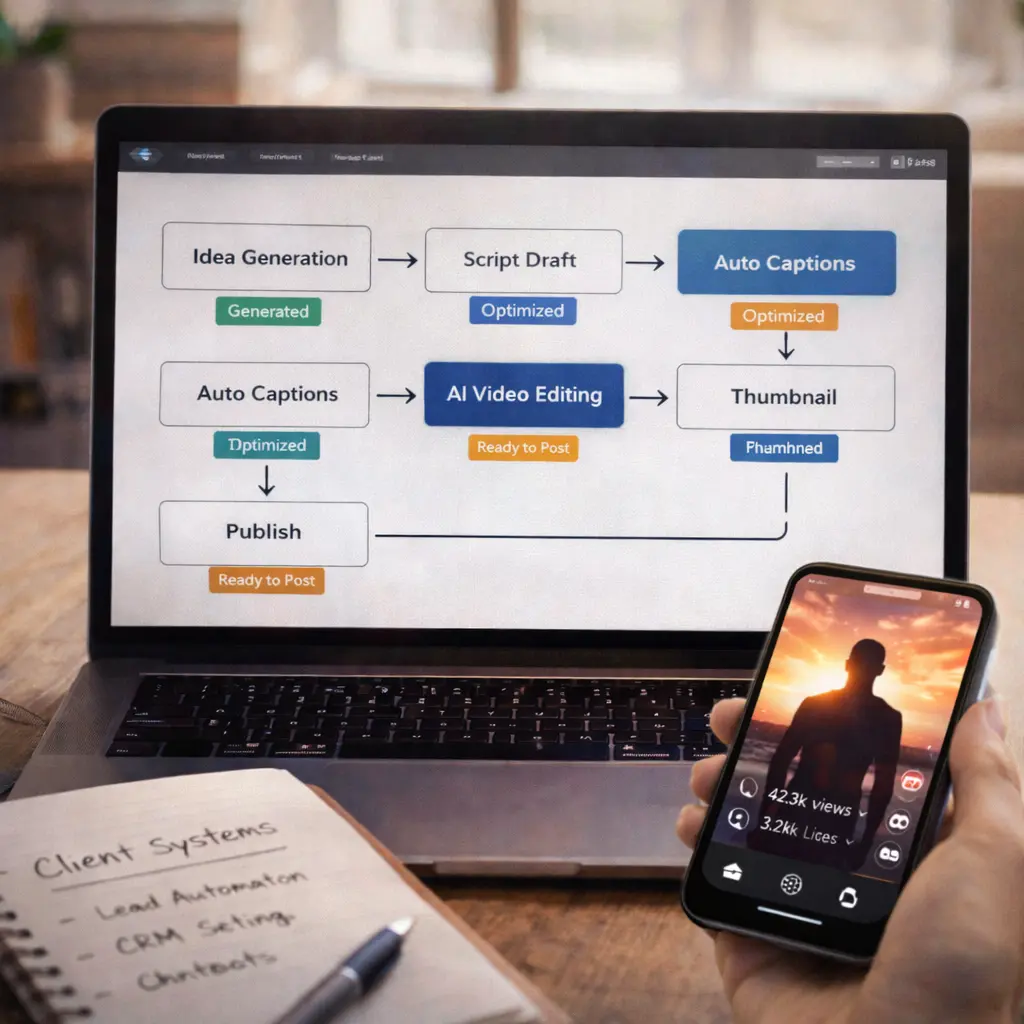
Step 1: Idea Generation (2 minutes)
- Ask ChatGPT: “Generate 10 Instagram Reel ideas for [your niche]”
- Pick best idea
Step 2: Script Writing (2 minutes)
- ChatGPT prompt: “Write 60-second Instagram Reel script about [topic]. Include hook in first 3 seconds, 3 key points, CTA at end.”
Step 3: Choose Format (1 minute)
- Talking-head? → Record with phone
- Faceless? → Use Runway Gen-2 + ElevenLabs voiceover
- Educational slides? → Use Canva
- Repurposed content? → Use OpusClip
Step 4: Create Visuals (5 minutes)
- If filming: Record in CapCut directly
- If AI-generated: Use Runway/Canva
- If repurposing: Upload to OpusClip
Step 5: Edit (5 minutes)
- Import to CapCut
- Apply trending template
- Auto-generate captions
- Add trending audio
- Export
Total: 15 minutes from idea to ready-to-post Reel.
COST BREAKDOWN
Free Tier (Start Here):
- CapCut: $0
- Canva Free: $0
- ElevenLabs Free: $0 (limited)
- InShot Free: $0 (with ads) Total: $0/month (can create 10-15 Reels/month)
Optimal Setup ($30-50/month):
- CapCut: $0
- Canva Pro: $13/month
- ElevenLabs: $5/month
- OpusClip: $9/month
- Pictory: $23/month Total: $50/month (unlimited Reels)
Creator Pro Setup ($70-100/month):
- All above tools: $50
- Descript: $12/month
- Runway Gen-2: $12/month
- Steve.AI: $20/month Total: $94/month
COMMON MISTAKES
Mistake #1: Using Every AI Tool Don’t use 10 tools per Reel. Pick 2-3 max. Complexity kills consistency.
Mistake #2: Not Adding Personal Touch Pure AI content feels soulless. Add your personality, opinions, or unique angle.
Mistake #3: Ignoring Trending Audio AI tools can’t pick trending sounds. Manually check Instagram’s trending audio library weekly.
Mistake #4: Over-Editing Reels don’t need Hollywood production. Quick, authentic > slow, perfect.
REAL RESULTS

My Numbers (8 Months Using AI Tools):
- Followers: 800 → 34,000
- Avg views per Reel: 15K-25K
- Time per Reel: 4 hours → 15 minutes
- Posting frequency: 1/week → 5-7/week
- Sponsored deals: ₹25K-₹50K per Reel
Key insight: Consistency (enabled by AI speed) > perfection.
FAQs
Q1: Will Instagram penalize AI-generated Reels?
No. Instagram doesn’t penalize AI content. They penalize low-quality, boring content. If your Reel provides value, AI or not doesn’t matter.
Q2: What’s the best tool for complete beginners?
CapCut. Free, easy, everything you need in one app.
Q3: Can I monetize AI-generated Reels?
Yes. As long as content is original (not reposts), you can monetize through sponsorships, affiliate links, digital products.
Q4: How many Reels should I post weekly?
Minimum 3-4 for growth. 5-7 optimal. AI tools make this sustainable.
Q5: Do AI voiceovers perform as well as real voice?
Yes, if the voiceover sounds natural (use ElevenLabs). Many successful faceless accounts use AI voices exclusively.
Q6: What’s the #1 tool to invest in first?
Canva Pro ($13/month). Most versatile for graphics, templates, and AI image generation.
Q7: How to make AI Reels not look generic?
Add unique angles, personal stories, current events. AI handles production, you handle perspective.
Q8: Best niche for AI-generated Reels?
Educational, motivational, finance, health tips, productivity—anywhere value > personality.