
Introduction
Creating a resume used to be simple—list your education, add your experience, and apply for jobs. But today, the hiring process has changed completely. Most companies now use Applicant Tracking Systems (ATS) to filter resumes before a recruiter ever sees them.(AI resume builder)
This creates a major problem for job seekers.
Even if you have the right skills, your resume may never reach a human because:
- It lacks the right keywords
- It is not formatted properly
- It does not highlight measurable achievements
- It looks generic and outdated
As a result, thousands of candidates get rejected without understanding why.
This is where AI resume builders come in.
AI tools can analyze job descriptions, optimize your resume content, suggest improvements, and help you create a professional, ATS-friendly resume in minutes instead of hours.
In this guide, you will learn how to use AI to build a powerful resume step-by-step—even if you are a complete beginner.
What is an AI Resume Builder?
An AI resume builder is a tool that uses artificial intelligence to help you:
- Write better resume content
- Optimize keywords for ATS systems
- Improve formatting and structure
- Suggest stronger bullet points
- Highlight your achievements effectively
Instead of starting from scratch, AI gives you a structured, optimized resume that aligns with current hiring standards.
Why Traditional Resumes Fail Today
Before learning the AI method, it’s important to understand why most resumes don’t work.
1. No ATS Optimization
Most resumes are not optimized for keyword-based filtering systems.
2. Generic Content
Using the same resume for every job reduces your chances of getting shortlisted.
3. Weak Bullet Points
Statements like “Responsible for managing tasks” do not show impact.
4. Poor Formatting
Complex designs confuse ATS systems and reduce readability.
Benefits of Using AI Resume Builders
- Saves time and effort
- Improves resume quality instantly
- Increases chances of passing ATS filters
- Helps beginners write professional content
- Provides structured formatting
Popular AI Resume Builder Tools
Here are some of the best tools you can use:
- ChatGPT
- Rezi
- Teal
- Zety
Each tool has different strengths, but all of them can help you create a strong resume.
How to Implement This (Step-by-Step)
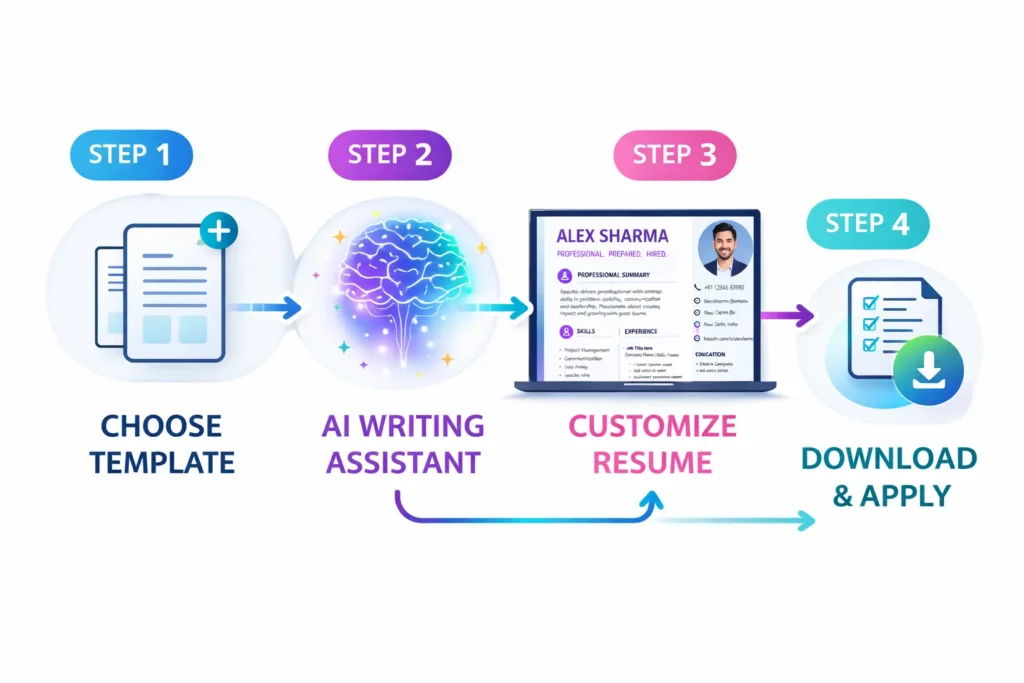
Step 1: Choose Your Target Job Role
Before creating a resume, decide:
- What role are you applying for?
- What skills are required?
👉 Example: Digital Marketing Executive, Software Developer, Data Analyst
This step is important because your resume must be tailored to a specific role.
Step 2: Collect Job Descriptions
Go to job platforms and copy 3–5 job descriptions for your target role.
Analyze:
- Common keywords
- Required skills
- Responsibilities
These will be used to optimize your resume.
Step 3: Use AI to Generate Resume Content
Use an AI tool with a prompt like:
“Create a professional resume for [job role]. Include skills, achievements, and optimize for ATS using these job descriptions.”
- Summary section
- Skills list
- Experience bullet points
Step 4: Customize and Edit (Very Important)
Do NOT copy AI output blindly.
Edit:
- Add your real experience
- Adjust tone to sound natural
- Remove generic lines
👉 Make sure your resume reflects YOU, not just AI.
Step 5: Add Measurable Achievements
This is the biggest differentiator.
Instead of:
“Worked on marketing campaigns”
Write:
“Managed marketing campaigns that increased lead generation by 40% in 3 months”
Numbers make your resume stronger and more credible.
Step 6: Optimize for ATS
Ensure:
- Keywords match job description
- Simple formatting (no fancy graphics)
- Standard headings (Experience, Skills, Education)
Step 7: Format Your Resume Properly
Best practices:
- 1–2 pages max
- Clean font (Arial, Calibri)
- Bullet points for readability
- Consistent spacing
Step 8: Test and Improve
Apply to jobs and monitor:
- Response rate
- Interview calls
If results are low:
- Update keywords
- Improve bullet points
- Refine structure
Real-World Example
Before AI Optimization:
“Responsible for handling customer queries and managing operations”
After AI Optimization:
“Handled 50+ customer queries daily and improved response efficiency by 30%, enhancing customer satisfaction”
👉 Notice the difference: clarity, numbers, impact.
Comparison Table: AI Resume Builders
| Tool | Best For | Key Feature |
|---|---|---|
| ChatGPT | Content generation | Flexible prompts |
| Rezi | ATS optimization | Keyword targeting |
| Teal | Resume + tracking | Job matching |
| Zety | Templates | Easy design |
Pros and Cons of AI Resume Builders
Pros
- Fast and efficient
- Beginner-friendly
- Improves content quality
- ATS-friendly optimization
Cons
- Requires manual editing
- Risk of generic output
- Over-reliance can reduce uniqueness
Common Mistakes to Avoid
- Copy-pasting AI content without editing
- Using the same resume for all jobs
- Ignoring keywords
- Adding false information
- Over-designing the resume
Real Experience Tips
- Always tailor your resume for each job
- Focus on results, not responsibilities
- Keep it simple and readable
- Update your resume regularly
👉 Key Insight:
A good resume is not about listing tasks—it’s about showing impact.
Conclusion
AI resume builders have made it easier than ever to create professional, high-quality resumes. However, the real power lies in how you use them.
If you:
- Choose the right role
- Use AI for optimization
- Customize your content
- Focus on measurable achievements
You can significantly improve your chances of getting shortlisted.
Start today, build your AI-powered resume, and take control of your job search.
FAQ
Q1: Are AI resume builders safe to use?
Yes, but always review and edit the content before using it.
Q2: Can beginners use AI resume tools?
Yes, they are especially helpful for beginners.
Q3: Do AI resumes pass ATS systems?
Yes, if properly optimized with keywords and formatting.
Q4: Should I use the same resume for every job?
No, always customize it for each role.
Q5: How long should a resume be?
Ideally 1–2 pages.